Connectors
A connector reads a tool you already use, so metric names and documents arrive by themselves. It only reads: nothing is ever written back to the tool.
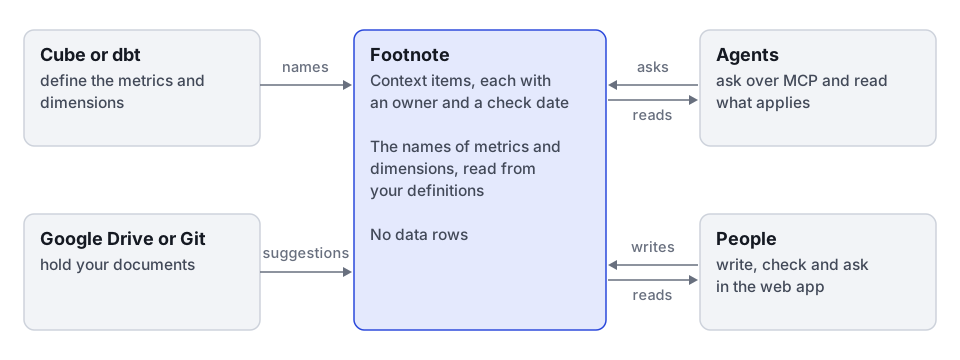
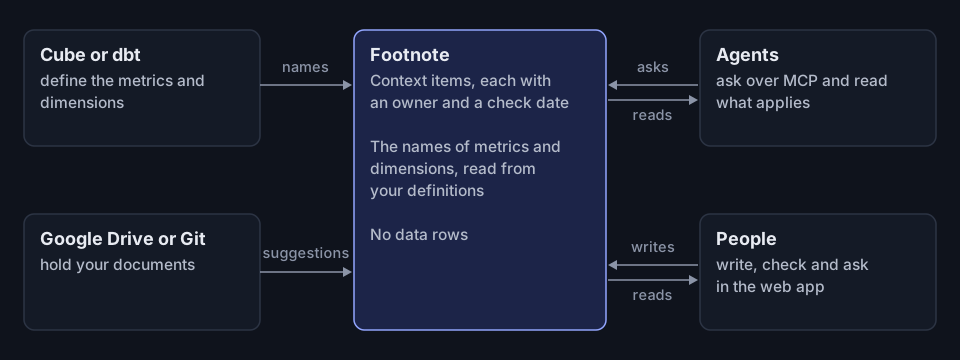
Two kinds
| Kind | What it reads | What it may change |
|---|---|---|
| Definitions | The metrics and dimensions a tool defines | It flags the context that relies on a definition that changed or went |
| Documents | Folders, spaces or pages you choose | It makes at most one suggestion per document, for one domain’s owners to review |
Neither kind publishes anything. Only an owner does that.
The connectors
| Connector | Reads | How often |
|---|---|---|
| Cube | Definitions, from Cube model files | Every hour, 15 minutes at the shortest, out of date after 6 hours |
| Cube Cloud | Definitions, from a Cube Cloud deployment’s metadata | Every hour, 15 minutes at the shortest, out of date after 6 hours |
| dbt MetricFlow | Definitions, from dbt’s built file | Every hour, 15 minutes at the shortest, out of date after 6 hours |
| Static list | Definitions, from a list you paste | Every hour, out of date after 6 hours |
| Markdown in Git | Documents, from a Git repository | Every day, 15 minutes at the shortest, out of date after 2 days |
| Google Drive | Documents, from Google Docs in folders | Every day, 15 minutes at the shortest, out of date after 2 days |
An admin can set each source’s own schedule, within those limits.
Connect one
Only admins connect a tool, in Settings, Integrations. The five steps are in Integrations:
- Pick the tool. The page says what it will hold and never hold.
- Connect it, and press Test connection, which must pass before you go on. It reads once and keeps nothing.
- Choose the views or folders to read.
- Map each to a domain. Every folder needs one, and a view may go without.
- Schedule it, and say why you are adding it.
Change settings goes through the same steps, filled in. A secret left empty keeps the one stored.
Whoever runs the service can also name a Cube model folder or another connector’s folder in its settings. Such a source is read only in the app: its settings are set on the server.
What a read does to definitions
| What happened | What follows |
|---|---|
| A definition an item relies on changed | The item is Due for a check, and still reaches agents, marked as possibly out of date |
| A definition an item relies on went | The same, naming the new definition if the tool renamed it |
| A definition an item only mentions changed | The item stays as it is, and its owners are told |
| A domain changed in the tool | Nothing is flagged. The owners are told, and the domain stays until an owner changes it |
| The read failed | Nothing changes, and the source’s page says why |
Publishing a version written against the current definitions clears the flag.
A read that could not read everything keeps what it missed: only a complete read marks a definition as gone.
What counts as a change depends on what the tool gives. Cube model files and dbt give each calculation, so a changed calculation flags. Cube Cloud gives metadata only: a member’s type, how it adds up, its title, description and format. A changed calculation there flags nothing until one of those, or its meta, changes too.
A model that moves from Cube model files to Cube Cloud keeps its definitions, since both read them as the same ids. Disconnect the files source an admin added, and the next Cube Cloud read takes them over. It flags no item for the move and tells the owners once.
A files source set up on the server (CUBE_MODEL_DIR) cannot be disconnected, so its refs stay with it.
A member the files source had already marked missing takes the new mark as a change when it comes back, so the items on it are flagged.
A member Cube Cloud does not show, for example one the security context hides, stays with the disconnected source and is never marked missing.
What a read does to documents
For each new or changed document, a read makes one suggestion in the Inbox of the domain’s owners. They are told once per read, never once per suggestion.
- Changed. A changed document replaces its open suggestion. One already published becomes a suggestion to change that item.
- Declined. A suggestion an owner declined is not offered again until the document changes.
- Gone. A document that left withdraws its open suggestion. An item it became is listed for its owners and stays as it is.
- Skipped. A document with an email address, a phone number or what looks like a password or key is skipped. So is one that names no metric, market or other term, and one with no words.
- Waiting. Past the source’s daily cap, a document waits and goes first next time.
A read that would remove more than half of a source’s documents at once, and more than five, keeps them all, so a broken folder never empties the Inbox.
Each document’s text lives in memory for one read. Only its link, title, change mark and a quote of at most 500 characters are kept. Who may read a document in the tool is not copied.
Watch a source
Settings, Integrations, lists every source with how it is:
| Status | What it means |
|---|---|
| Healthy | Its last read worked, or it has not been read yet |
| Paused | An admin paused it. The job leaves it out |
| Needs a new key | Its last read failed because its key was refused or is missing |
| Failed | Its last read failed for another reason |
Beside its status, a source that is waiting to be read says Queued: it was just added or changed, you asked for a read, or its time has come, and the job has not taken it yet. The job runs every five minutes. Reading means the job is reading it now. A failed read stays shown while its retry is queued.
Pausing a source also switches off its figures in Ask, whatever the Show figures in Ask switch says: an answer links into the tool instead. Its figures settings stay on its page, and an admin can still change them. What is published stays. Resume it and it is queued for a read.
Figures that are switched on also go off in Ask when the data contact leaves the workspace or the token is gone. The tool’s page says which, so you can name another contact or set the token again.
A source whose key was refused is not paused: it is tried again at its usual time, so a key fixed in the tool works again by itself. Until then Integrations says it needs a new key and when it was last tried, its page says when it is tried again, and both offer Replace key.
Read again reads one source at the job’s next turn, and a change to its settings does the same. To read the server’s own sources from the command line, the ones its settings name or the demo when they name none, run the command below. It never reads a source an admin added.
npm run connectors:syncTo read every source, an admin sends POST /api/v1/operations/jobs/connectors.sync/run.
The job looks for due sources as the service starts and every five minutes after, so a model folder the server was started on is read at once. After a failure that clears by itself, such as a timeout, a source tries again after one minute, then two, four and so on. It waits at most half of its out-of-date time, and never less than the tool asked.
Disconnect one
Disconnect ends a source an admin added: it reads no more and its secrets are removed. A document source’s open suggestions are withdrawn, and what owners published stays. A definitions source’s definitions stay as they were, so connecting the tool again reads it whole.
Build your own
A new connector needs no change to the app: see Build a connector. Connector security has the rules the service enforces on every connector.