See what agents asked
Observability shows what agents asked about and what they got, by topic, so you see where the context answers well and where it says Not found. The topics are counts only: never the words of a question, and never who asked.
Who sees it
Admins see every domain. An owner sees the domains they own, and anyone else does not see Observability. Open Observability at the foot of the sidebar.
Overview: what agents asked
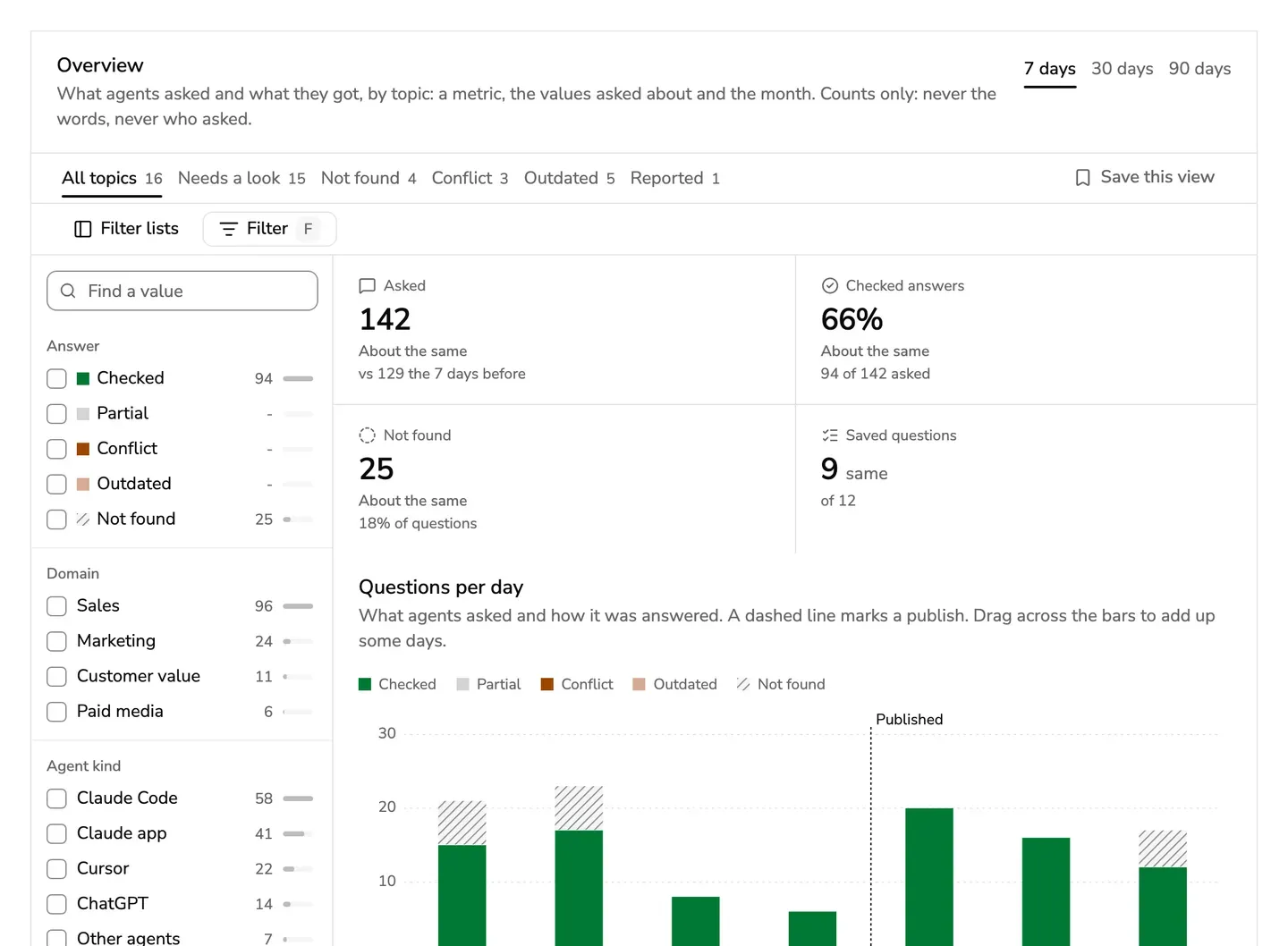
A topic is one thing agents asked about: a metric, the values asked about, such as a market, and the month.
- The numbers at the top: how many questions, how many answers were Checked, how many found nothing, and how many saved questions still get the same answer. Press Checked answers or Not found to see only those topics.
- Questions per day shows how each was answered. A dashed line marks a publish, so you see what it changed. Drag across the bars to add up some days.
- Topics lists each topic with its domain, how often it was asked, and how it was answered.
Pick 7, 30 or 90 days at the top. The views above the list, such as Needs a look, Not found and Reported, narrow the topics, and Filter narrows them by domain, answer, metric, market, month and more. Admins can filter by agent kind too. Save this view keeps a filter beside the others, for everyone in the workspace.
A count under 5 is hidden, so it never gives a person away. Agents are counted by kind, such as Claude Code or Cursor, never by person.
Quality: saved questions
A saved question is answered again after every change: a publish, an archive, a restore, a connector read, or a check date passing. It needs no AI model, as it reads what agents get, not how an agent words it.
- Save one from an answer in Ask, or press Add a question here.
- Each question is under Needs a look, Changed or Same: its saved answer beside the answer now, with the words that differ marked.
- When the new answer is right, press Keep the new answer. When it is not, open the item.
- Run now answers every saved question again at once. Nothing is published by it.
Feedback
What people and agents said about the answers: good answers, answers with something wrong, and reports. For Good answer and Bad answer, only the verdict, the domain and the hour are kept. A report keeps who sent it and what they wrote, as its card in the Inbox shows.
Alerts
An alert is a card in the Inbox of the people it is for, never an email. The rules say when one comes, such as:
- Not found: a topic found nothing 5 or more times in 7 days. Its card is the one in When nothing is written yet.
- A saved question needs a look.
- Conflict: two items that apply say different things, asked 3 or more times.
- A check is due: a reminder to the owner at 07:00.
Owners see and mute the alerts for their own domains. Admins also get alerts about the service, such as calls that fail or new views a tool has that nobody chose, and they turn rules off and change the levels, such as 3, 5 or 10 times for Not found.
Usage
Admins also see Usage: how many tool calls agents made, how fast the replies were, which kinds of agent called, and what the AI model cost this month.