Run in production
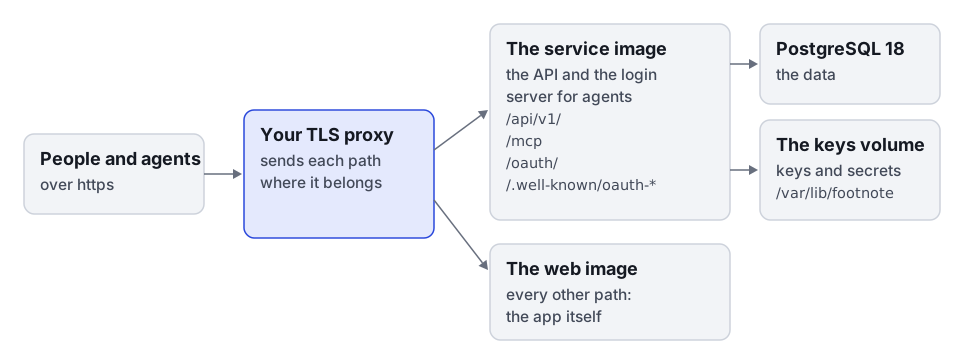
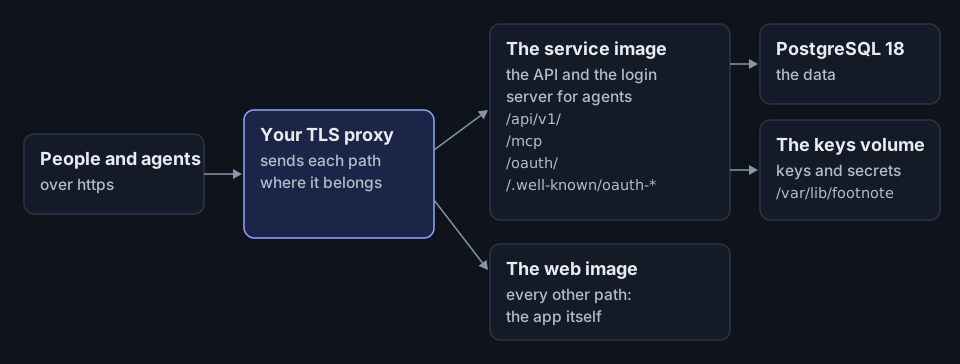
Run the service image and the web image for real people, beside a PostgreSQL 18 database and behind a TLS proxy. Where to run Footnote says what a host must offer.
Production mode
The service image starts in production mode unless told otherwise. People sign in with your company’s provider, and the people picker, dev tokens and the demo are refused. With no sign-in set up, it refuses to start and names the missing settings.
compose.yaml sets NODE_ENV=development, which takes the image out of production mode. That turns on the people picker, where anyone can sign in as anyone, an admin included.
Run the image in production mode
-
Set up sign-in. Follow Set up company sign-in.
-
Make the keys, once. They go in the volume that keeps them, and a key that exists is kept:
Terminal window docker run --rm -v footnote-keys:/var/lib/footnote <image> npm run keys:createSet
FOOTNOTE_SECRETS_DIR=/var/lib/footnote/secretstoo, so the tokens and signed links of the tools you connect are kept in the same volume. Without it, a tool that needs a secret can’t be connected. -
Set the database addresses.
DATABASE_URLis the service’s own role andDATABASE_URL_MIGRATEis the owner, which the image needs to apply the schema at start. When the roles do not exist yet, also setDATABASE_URL_BOOTSTRAPto a superuser. See the database guide. -
Set the addresses. The login server for agents needs https in production:
Terminal window MCP_RESOURCE_URL=https://footnote.example.com/mcpFOOTNOTE_WEB_ORIGINS=https://footnote.example.com -
Put a TLS proxy in front. It sends
/api/v1/,/mcp,/oauth/and/.well-known/oauth-*to the service directly, and only the rest to the web image, with the public host. -
Name that proxy in
FOOTNOTE_TRUSTED_PROXIES, as the next section says.
See Service settings for every other setting, Agent sign-in settings for the keys agents sign in with, and Watch the service to check it runs. Back up the database and the keys’ volume as Back up, restore and upgrade says. Security says what leaves the service.
The proxy in front
FOOTNOTE_TRUSTED_PROXIES is the setting people trip on. It names the addresses the proxy connects from, comma-separated. Your host’s documentation says which ones apply. Each entry is one of:
- an address;
- a range, such as
10.0.0.0/8; loopback,linklocaloruniquelocal.
Left unset, the service sees the proxy as the only caller and http as the only protocol:
- Every caller shares one request limit before sign-in, 120 a minute, so one caller can lock sign-in for everyone else.
- Request records and logs see every caller at the proxy’s address.
Name only what the proxy connects from. Anything else that can connect from an address you name can say it is any caller, and so get around the limit.
The web image’s nginx does not help here. It overwrites X-Forwarded-For and X-Forwarded-Proto with what it sees, so behind another proxy it hides the caller’s address and the https. That is why /api/v1/ goes to the service directly.
The web image
What the web image does for a browser:
| What | How |
|---|---|
| Compression | Every text file ships gzipped at the highest level, and the service’s JSON is gzipped on the way |
| Security headers | A Content-Security-Policy that runs only the app’s own scripts, and no framing |
| HSTS | Only when a proxy in front ended TLS and says so with X-Forwarded-Proto: https |
| Missing files | A missing file is a real 404. Every other address opens the app |
| For robots | robots.txt keeps search engines out. llms.txt gives an agent the documentation as text |
Its log holds the method, path and status of each request, with no query string and no caller’s address.