Keep context up to date
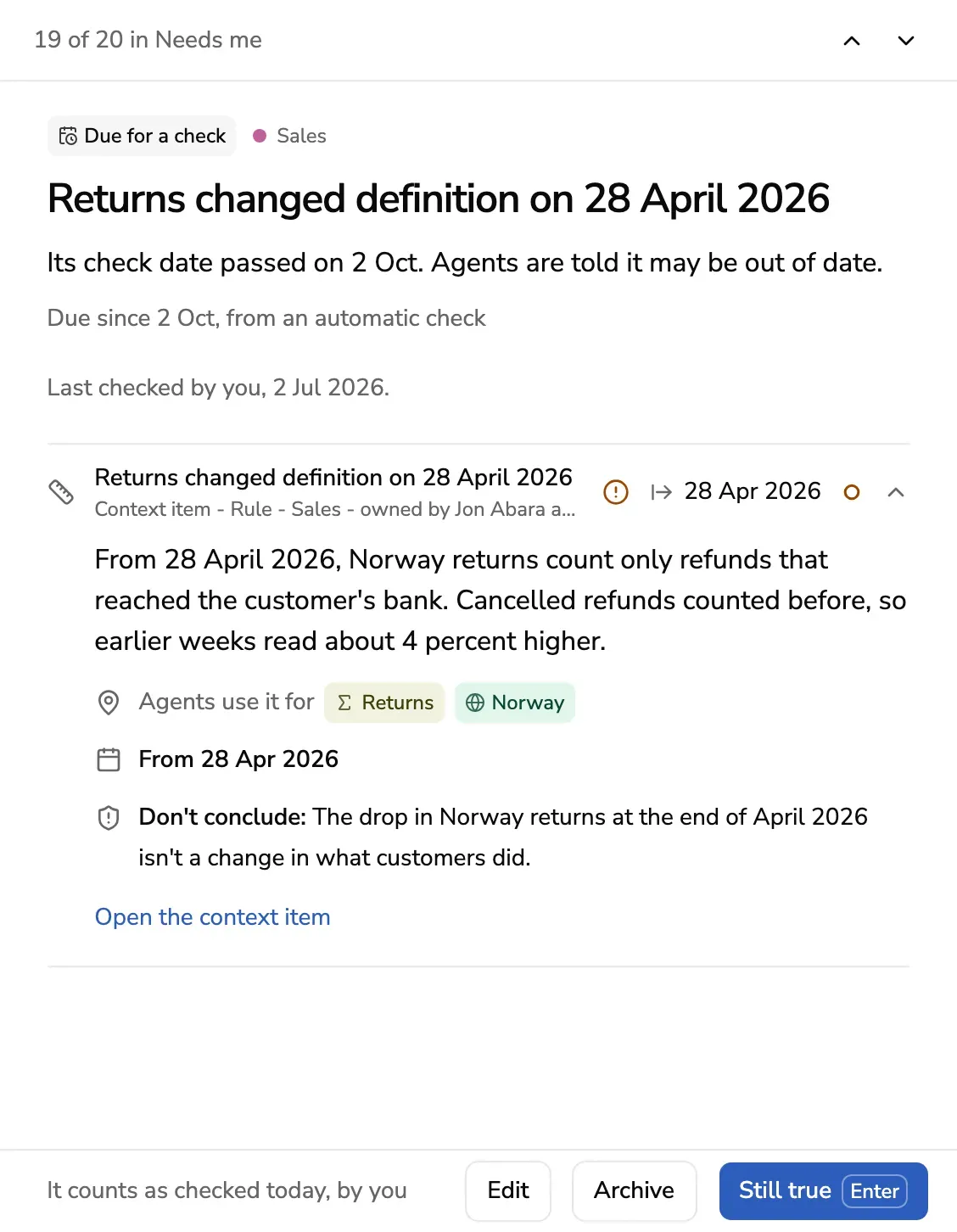
A published context item has a check date. When the date passes, or a definition it relies on changes, the item is due for a check, and agents are told it may be out of date. Your Inbox brings each one to you, with what someone reported, so the context agents read stays true.
Who gets these cards
The owners of a domain get the cards for the context items in it. Admins get them for every domain. In the Inbox they are under Due for a check and Reported.
Due for a check
The card says why the item is due:
- Its check date passed. Every item gets one when it is published: 90 days later, unless your workspace has set another number. An item about something still going on is checked again sooner.
- A definition changed. A connector read that a metric or dimension the item relies on changed in its tool, after the item was checked. The card names it and the day.
When a definition the item uses is gone from its tool, the item’s page says so under Due for a check, and Still true is refused: change the item instead.
Answer the card in one of three ways:
| Press | When | What happens |
|---|---|---|
| Still true | The item is right as it is | It counts as checked today, by you, and its next check date moves on |
| Edit | Something in it changed | The editor opens on the item. What you publish replaces it, with a new check date |
| Archive | It no longer applies | Agents stop getting it from the next question |
The card leaves the Inbox, the next one opens, and Undo is offered for a moment. A card you answered is under All, as Done.
Until someone answers, an answer that uses the item starts with Outdated: see Answer lines. In Ask, an owner sees Mark it still true beside the item, under Used. The item’s own page shows Due for a check too, with Still true beside it.
Reported
Someone said an item is wrong or unclear, from Ask or from a chat with an agent. The card shows what they wrote, who sent it and from where. Agents keep getting the item until it changes.
- Open the context item to read it, and change it if they are right.
- Not a problem closes the report when the item is right as it is. The item stays as it is.
When an agent found nothing at all, the card is under Nothing written yet instead: When nothing is written yet.